Submit Your Sourcing

  • First Name *

  • Last Name *

  • E-mail *

  • Phone *

  • Add *

  • POSTAL *

  • Country *

  • Tell us what kind products you need from China. *

  • Submit

Online consultation

  • First Name *

  • Last Name *

  • E-mail *

  • Phone *

  • Add *

  • POSTAL *

  • Country *

  • Tell us what kind products you need from China. *

  • Submit

  • Security Code
    Refresh the code
    Cancel
    Confirm

English
  • Latina
  • English
  • عربي
  • Polski
  • Deutsch
  • Русский язык
  • Français
  • suomi
  • қазақ
  • 한국어
  • Nederlands
  • Čeština
  • ກະຣຸນາ
  • Luganda
  • română
  • Malay
  • Монгол
  • ဗာရမ်
  • Afrikaans isiXhosa
  • Português
  • 日本語

English
  • Latina
  • English
  • عربي
  • Polski
  • Deutsch
  • Русский язык
  • Français
  • suomi
  • қазақ
  • 한국어
  • Nederlands
  • Čeština
  • ກະຣຸນາ
  • Luganda
  • română
  • Malay
  • Монгол
  • ဗာရမ်
  • Afrikaans isiXhosa
  • Português
  • 日本語

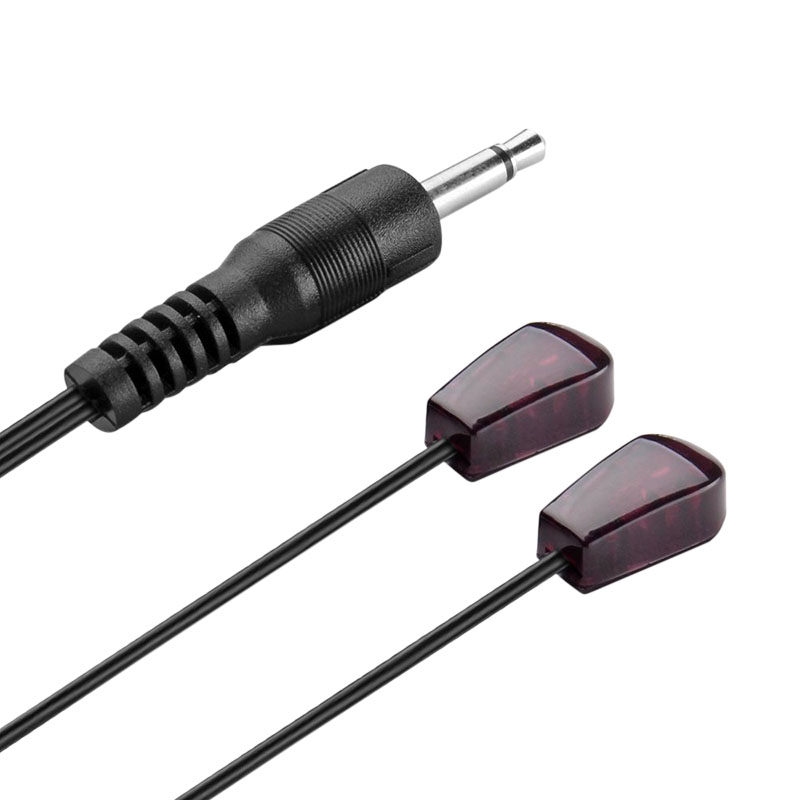
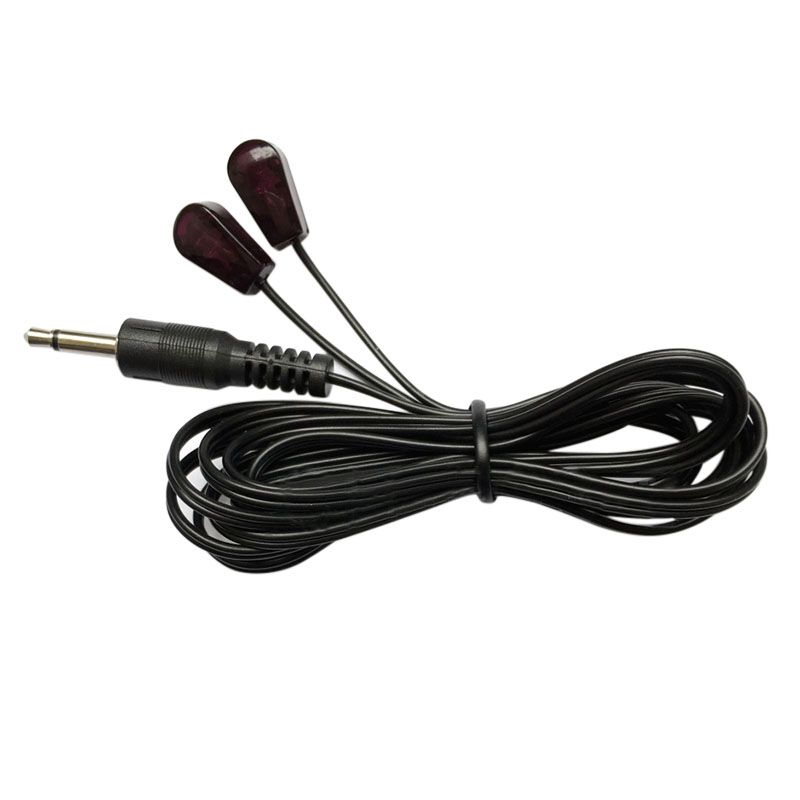
IR Emitter Extender Extension Cable 3.5mm Jack Remote Control Extender Infrared Transmitter Wire Cord

You can position an emitter in otherwise difficult-to-access spaces and work around things like media cabinets, decorations, and so on.Allows you to control A/V component by the existing IR controller, such as amplifier, cable box, HD DVR, stereo receiver, Satellite TV receiver, CD player, DVD player, Bluray player or other components which are controlled by IR signal.

Price Interview

IR Emitter Extender Extension Cable 3.5mm Jack Remote Control Extender Infrared Transmitter Wire Cord

Interview

产品详情

BrandRocfly
Connector TypeAuxiliary
Cable TypeAUX, Component
ColorRed

About this item

  • Product: IR Emitter Extension Cable; Jack: 3.5mm; Total Length: 3meters/9.8feet; Emission Angle: +/- 45°
  • Works with all 38-56kHz IR remote control and devices with an IR input port.
  • Low current drive, low power consumption, long launch distance, small size installed.
  • Applied to infrared forwarding equipment, audio and video transmission equipment, IR remote wireless transceiver, centralized control equipment, etc.
  • Please note that the infrared emitter head is glued to the side of the infrared receiver tube, do not cover it, otherwise the device will not be used, and it will be insensitive to remote control by remote control.

IR emitter


Instructions for use:

  • Insert the product plug into the interface of the infrared forwarding device. Generally, the interface has an interface similar to the transmitting signal such as IR OUT, IR TX, IR EMITTER.
  • Paste the infrared emitter head at the appropriate position on the panel of the controlled device. The correct position will affect the remote control sensitivity. Generally, look for the dark red translucent panel of the controlled device. Some devices will indicate the R, IR, INF and other characters. You can also use the flashlight to illuminate the panel to see if there are any components in the red box. This component is an infrared receiver tube.

Specification:

  • Product Name: Infrared Emitter Cable
  • Feature: with 2 head
  • Total Length:3 meters/9.8feet
  • Jack:DC3.5mm
  • Material: Plastic, Metal
  • Head Size:15 x 8 x 5mm / 0.59 x 0.31 x 0.2inch (L*W*H)

45 degree

Detecting Angle +/-45°:

  • The emission angle is +/- 45°
  • Less than 4 Inch distance from the infrared receiver tube of your device to the emitter is better for the sensitivity.
  • Please note that the infrared emitter head is glued to the side of the infrared receiver tube, do not cover it, otherwise the device will not be used, and it will be insensitive to remote control by remote control
    .


Item Specification:
Feature:
Passes IR communication: Used with an IR Repeater kit to control a device; Extend remote control ability to any room in the house
Sticks directly onto the AV equipment; Three emitters on a single plug; Adhesive backing allows the emitter to be attached to the IR eye of a device
Quad Heads allow you to control multiple pieces of equipment with only one IR output; For use with IR extender extension system, Xbox One, IR Connecting Blocks and Home Automation controllers
The mini stick-on emitter includes a 10 ft cable between the emitter heads and the mini-plug
Allows you to control A/V component by the existing IR controller, such as amplifier, cable box, HD DVR, stereo receiver, Satellite TV receiver, CD player, DVD player, Bluray player or other components which are controlled by IR signal
It connects using a 3.5mm jack (similar to a pair of standard headphones)
It is an IR transmitter, not a receiver
Two conductors on the the 3.5 mm jack
Length: 10 Feet
XBox One installation:
You can install this IR extension cable with Xbox One in a few simple steps:
1. Connect your IR extension cable to the IR port on the back of the Xbox One
2. Position the emitters near the devices you want to control. These may be designed to fit under the device near the IR window, or they may be sticky and adhere directly to the IR window
3. Test to make sure you can control the device. Reposition the emitters if necessary
Package Includes:

1 x Infrared Remote Control Extender Emitter Cable


No comment

产品详情

BrandRocfly
Connector TypeAuxiliary
Cable TypeAUX, Component
ColorRed

About this item

  • Product: IR Emitter Extension Cable; Jack: 3.5mm; Total Length: 3meters/9.8feet; Emission Angle: +/- 45°
  • Works with all 38-56kHz IR remote control and devices with an IR input port.
  • Low current drive, low power consumption, long launch distance, small size installed.
  • Applied to infrared forwarding equipment, audio and video transmission equipment, IR remote wireless transceiver, centralized control equipment, etc.
  • Please note that the infrared emitter head is glued to the side of the infrared receiver tube, do not cover it, otherwise the device will not be used, and it will be insensitive to remote control by remote control.

IR emitter


Instructions for use:

  • Insert the product plug into the interface of the infrared forwarding device. Generally, the interface has an interface similar to the transmitting signal such as IR OUT, IR TX, IR EMITTER.
  • Paste the infrared emitter head at the appropriate position on the panel of the controlled device. The correct position will affect the remote control sensitivity. Generally, look for the dark red translucent panel of the controlled device. Some devices will indicate the R, IR, INF and other characters. You can also use the flashlight to illuminate the panel to see if there are any components in the red box. This component is an infrared receiver tube.

Specification:

  • Product Name: Infrared Emitter Cable
  • Feature: with 2 head
  • Total Length:3 meters/9.8feet
  • Jack:DC3.5mm
  • Material: Plastic, Metal
  • Head Size:15 x 8 x 5mm / 0.59 x 0.31 x 0.2inch (L*W*H)

45 degree

Detecting Angle +/-45°:

  • The emission angle is +/- 45°
  • Less than 4 Inch distance from the infrared receiver tube of your device to the emitter is better for the sensitivity.
  • Please note that the infrared emitter head is glued to the side of the infrared receiver tube, do not cover it, otherwise the device will not be used, and it will be insensitive to remote control by remote control
    .


Item Specification:
Feature:
Passes IR communication: Used with an IR Repeater kit to control a device; Extend remote control ability to any room in the house
Sticks directly onto the AV equipment; Three emitters on a single plug; Adhesive backing allows the emitter to be attached to the IR eye of a device
Quad Heads allow you to control multiple pieces of equipment with only one IR output; For use with IR extender extension system, Xbox One, IR Connecting Blocks and Home Automation controllers
The mini stick-on emitter includes a 10 ft cable between the emitter heads and the mini-plug
Allows you to control A/V component by the existing IR controller, such as amplifier, cable box, HD DVR, stereo receiver, Satellite TV receiver, CD player, DVD player, Bluray player or other components which are controlled by IR signal
It connects using a 3.5mm jack (similar to a pair of standard headphones)
It is an IR transmitter, not a receiver
Two conductors on the the 3.5 mm jack
Length: 10 Feet
XBox One installation:
You can install this IR extension cable with Xbox One in a few simple steps:
1. Connect your IR extension cable to the IR port on the back of the Xbox One
2. Position the emitters near the devices you want to control. These may be designed to fit under the device near the IR window, or they may be sticky and adhere directly to the IR window
3. Test to make sure you can control the device. Reposition the emitters if necessary
Package Includes:

1 x Infrared Remote Control Extender Emitter Cable


IR Emitter Extender Extension Cable 3.5mm Jack Remote Control Extender Infrared Transmitter Wire Cord
You can position an emitter in otherwise difficult-to-access spaces and work around things like media cabinets, decorations, and so on.Allows you to control A/V component by the existing IR controller, such as amplifier, cable box, HD DVR, stereo receiver, Satellite TV receiver, CD player, DVD player, Bluray player or other components which are controlled by IR signal.
Long press to look detail
Long by picture save/share
INQUIRY

Online inquiry MORE+
  • Contacts *

  • E-Mail *

  • Mobile Phone

  • Description *

  • Submit

  • Security Code
    Refresh the code
    Cancel
    Confirm

Inquiry Content:


You have no items to require

Add Successfully

IR Emitter Extender Extension Cable 3.5mm Jack Remote Control Extender Infrared Transmitter Wire Cord

Enquiry
INQUIRY

Online inquiry MORE+
  • Contacts *

  • E-Mail *

  • Mobile Phone

  • Description *

  • Submit

  • Security Code
    Refresh the code
    Cancel
    Confirm

Inquiry Content:


You have no items to require

Add Successfully


RELATED PRODUCTS

 

Follow Us

Contact Us

+86 0755 27392160

+86 136 0307 9353

daisylee@v.saleingsun.com

www.cable-rocfly.com


Follow Us

Copyright © 2005-2015 MySite Ltd. All Rights Reserved.

添加微信好友,详细了解产品
使用企业微信
“扫一扫”加入群聊
复制成功
添加微信好友,详细了解产品
我知道了